Features: Simple Integration: Add Dante™ network audio to your Q-SYS system without network I/O cards or additional hardware. Dante integrates into the Q-SYS workflow, offering device discovery, synchronization, control and management for Dante audio within the Q-SYS network, alongside native Q-LAN and AES67 networks. Software-based...
Features: Simple Integration: Add Dante™ network audio to your Q-SYS system without network I/O cards or additional hardware. Dante integrates into the Q-SYS workflow, offering device discovery, synchronization, control and management for Dante audio within the Q-SYS network, alongside native Q-LAN and AES67 networks. Software-based...
Features: Simple Integration: Add Dante™ network audio to your Q-SYS system without network I/O cards or additional hardware. Dante integrates into the Q-SYS workflow, offering device discovery, synchronization, control and management for Dante audio within the Q-SYS network, alongside native Q-LAN and AES67 networks. Software-based...
Q-LAN & AES67 Networking Can AES67 and Q-LAN share the same network? Yes, AES67 and Q-LAN are both IT standards based networked audio solutions. They both have the same Quality of Service (QoS) requirements and both use the same IEEE1588-2008 (PTPv2) network clocking system. Will AES67 offer the same low-latency performance as Q-LAN?...
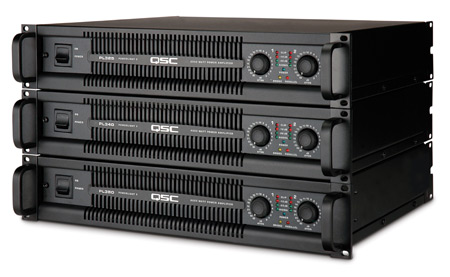
A stack of the three PL3 high-performance power amplifier models, all with DataPort network interface
File type: image/jpeg
Q-SYS Designer Software: Support Policy Q-SYS strives to bring new software solutions and features updates to better service our customers. To maximize business performance, you are encouraged to transition your systems to either the latest Q-SYS Designer Software release or the latest long-term support release. Q-SYS will provide...
Q-SYS Designer Software: Support Policy Q-SYS strives to bring new software solutions and features updates to better service our customers. To maximize business performance, you are encouraged to transition your systems to either the latest Q-SYS Designer Software release or the latest long-term support release. Q-SYS will provide...
Firmware Update Procedure To upgrade your device from unIFY Control Panel , launch Smart Firmware Update from the Tools menu. Be sure you have downloaded the latest firmware version from the device list below. Click on the Select File button and locate the firmware package (.SFU file) on your computer. Once the desired file has been...
Q-SYS Designer Software: Support Policy Q-SYS strives to bring new software solutions and features updates to better service our customers. To maximize business performance, you are encouraged to transition your systems to either the latest Q-SYS Designer Software release or the latest long-term support release. Q-SYS will provide...
DPM Manager DCP Manager DCPNet DCM Manager USB Drivers DPM 100/100H/300/300H, DCM 100/300 DPM Manager™ is the software application for set-up and configuration of the DPM Series Cinema Audio Processor/Monitor/Crossovers and DCM 100 and DCM 300 Crossover/Monitors, and for monitoring sound system operation. It provides all the necessary...